
Follow my public account: [Programming morning flowers picked up at dusk] to get the first content.
01 Introduction
After learning about internationalization when I first entered the industry, I have never encountered an application scenario again. Recently, the company has expanded its international business and the website needs to support multi-language switching. It is just a good time to try the internationalization of the Spring framework.I18N。
02 Overall design
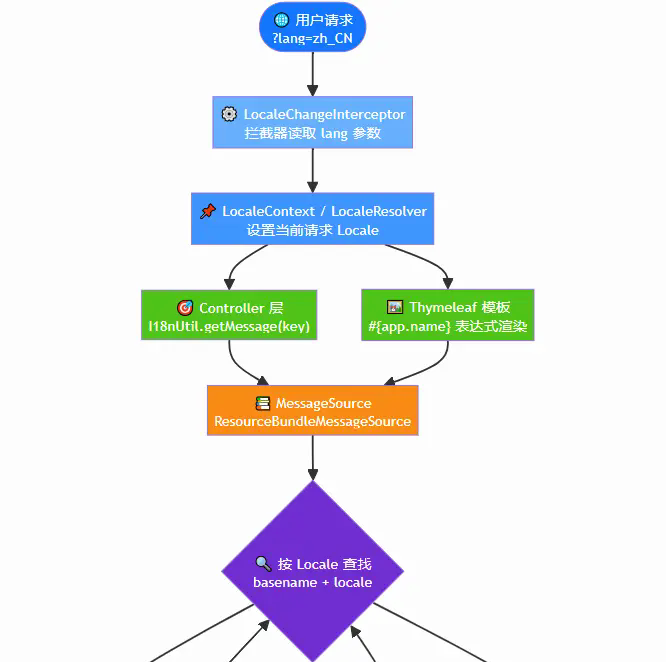
based onSpring Boot 3.5.16 + Thymeleaf + Java 17technical architecture to achieve multi-language internationalization (I18N)。
- rear end: pass
MessageSource+LocaleResolverImplement the internationalization of messages and support obtaining messages in the current language in Controller/Service/Tool class - front end: Via Thymeleaf template engine
#{...}Expressions to render multilingual text directly on the page - Switch mode: via URL parameters
?lang=zh_CNSwitch languages, language preference is saved in Session
Currently supported languages
| language tag | language | area | Resource file |
|---|---|---|---|
zh_CN | Simplified Chinese | China | messages_zh_CN.properties |
en_US | English | United States | messages_en_US.properties |
ja_JP | Japanese | Japan | messages_ja_JP.properties |
03 Project construction
3.1 Dependency introduction
<dependency>
    <groupId>org.springframework.boot</groupId>
    <artifactId>spring-boot-starter-thymeleaf</artifactId>
</dependency>
<dependency>
    <groupId>org.springframework.boot</groupId>
    <artifactId>spring-boot-starter-web</artifactId>
</dependency>
3.2 Configuration
/**
 * I18N 国际化配置
 * <p>
 * 自动根据 {@link SupportedLocale} 枚举构建 LocaleResolver,
 * 添加新语言时无需修改本类。
 */
@Slf4j
@Configuration
public class I18nConfig implements WebMvcConfigurer {

    @Value("${app.i18n.default-locale:zh_CN}")
    private String defaultLocaleTag;

    @Value("${app.i18n.param-name:lang}")
    private String paramName;

    /**
     * Session 存储用户选择的语言
     */
    @Bean
    public LocaleResolver localeResolver() {
        SessionLocaleResolver resolver = new SessionLocaleResolver();
        resolver.setDefaultLocale(SupportedLocale.fromLanguageTag(defaultLocaleTag).toLocale());
        log.info("I18N initialized: default-locale={}, supported-locales={}",
                defaultLocaleTag, SupportedLocale.values().length);
        return resolver;
    }

    /**
     * URL 参数切换语言: ?lang=zh_CN / ?lang=en_US / ?lang=ja_JP
     */
    @Bean
    public LocaleChangeInterceptor localeChangeInterceptor() {
        LocaleChangeInterceptor interceptor = new LocaleChangeInterceptor();
        interceptor.setParamName(paramName);
        return interceptor;
    }

    @Override
    public void addInterceptors(InterceptorRegistry registry) {
        registry.addInterceptor(localeChangeInterceptor())
                .addPathPatterns("/**");
    }
}
What needs to be explained here is:We must configureLocaleResolver
LocaleResolverThis is the key class for internationalization analysis and can set the default region. You can use the parser that comes with the framework or customize it.
LocaleChangeInterceptorInterceptors are not required and can be configured globally. The framework comes withLocaleChangeInterceptorWe can use the parameters to modify the region information. The parameters here are used by defaultlang。
With the interceptor, the interception configuration must also be available to intercept the required internationalized requests.
The following is the customized internationalization parameter configuration:
# 国际化自定义配置
app:
  i18n:
    # 默认语言
    default-locale: zh_CN
    # 语言参数名(URL参数 ?lang=xxx)
    param-name: lang
3.3 Define language configuration file
We define the language file toresourcesbelowi18nDown.
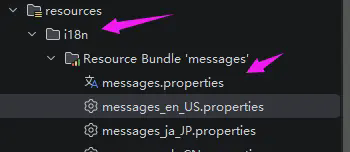
messages.properitiesis the default configuration, othermessages_XX.properitiesBelongs to the language configuration file.
Configure internationalization parameters:
spring:
  application:
    name: boot-i18n
  # 国际化配置
  messages:
    # 指定语言文件的目录
    basename: i18n/messages
    encoding: UTF-8
    # 设为 false 可避免找不到资源时回退到操作系统语言
    fallback-to-system-locale: false
    # 找不到消息 key 时返回 key 本身而非抛异常
    use-code-as-default-message: true
Language file collection:
# ==========================================
# messages_zh_CN.properities:中文-中国 国际化资源
# ==========================================
app.name=国际化示例应用
app.description=基于Spring Boot的多语言国际化方案

# 通用
common.success=操作成功
common.fail=操作失败
common.not_found=资源不存在

# 用户模块
user.welcome=欢迎您,{0}!
user.login.success=登录成功
user.login.fail=登录失败,账号或密码错误

# 区别其他文件的特殊配置,验证use-code-as-default-message=true的配置
test.ws=i18n


# ==========================================
# messages_en_US.properities:English (United States) i18n resources
# ==========================================
app.name=I18N Demo Application
app.description=Multi-language internationalization solution based on Spring Boot

# Common
common.success=Operation successful
common.fail=Operation failed
common.not_found=Resource not found

# User Module
user.welcome=Welcome, {0}!
user.login.success=Login successful
user.login.fail=Login failed, incorrect username or password

# ==========================================
# messages_ja_JP.properities:日本語 (日本) 国際化リソース
# ==========================================
app.name=国際化デモアプリケーション
app.description=Spring Bootに基づく多言語国際化ソリューション

# 共通
common.success=操作が成功しました
common.fail=操作が失敗しました
common.not_found=リソースが見つかりません

# ユーザーモジュール
user.welcome=ようこそ、{0}!
user.login.success=ログイン成功
user.login.fail=ログイン失敗、アカウントまたはパスワードが間違っています
3.4 Pages and services
<!DOCTYPE html>
<html xmlns:th="http://www.thymeleaf.org">
<head>
    <meta charset="UTF-8">
    <title th:text="#{app.name}">国际化示例应用</title>
    <style>
        * { margin: 0; padding: 0; box-sizing: border-box; }
        body { font-family: -apple-system, BlinkMacSystemFont, 'Segoe UI', Roboto, sans-serif;
               background: linear-gradient(135deg, #667eea 0%, #764ba2 100%);
               min-height: 100vh; display: flex; align-items: center; justify-content: center; }
        .card { background: #fff; border-radius: 16px; padding: 40px; box-shadow: 0 20px 60px rgba(0,0,0,0.3);
                max-width: 520px; width: 90%; }
        h1 { color: #333; margin-bottom: 8px; font-size: 24px; }
        .desc { color: #666; margin-bottom: 24px; }
        .section { margin-bottom: 20px; }
        .section h3 { color: #764ba2; margin-bottom: 8px; font-size: 16px; border-bottom: 2px solid #eee;
                      padding-bottom: 4px; }
        .lang-switch { display: flex; gap: 10px; margin-bottom: 24px; flex-wrap: wrap; }
        .lang-switch a { text-decoration: none; padding: 8px 20px; border-radius: 8px;
                         font-size: 14px; transition: all 0.2s; border: 2px solid #ddd; color: #555; }
        .lang-switch a:hover { border-color: #667eea; color: #667eea; }
        .lang-switch a.active { background: #667eea; color: #fff; border-color: #667eea; }
        .msg { background: #f5f7fa; border-radius: 8px; padding: 12px 16px; margin: 6px 0;
               font-size: 14px; color: #333; }
    </style>
</head>
<body>
<div class="card">
    <h1 th:text="#{app.name}">国际化示例应用</h1>
    <p class="desc" th:text="#{app.description}">描述</p>

    <!-- 语言切换 -->
    <div class="lang-switch">
        <a th:classappend="${#locale.language == 'zh'} ? 'active'"
           th:href="@{/(lang='zh_CN')}">🇨🇳 简体中文</a>
        <a th:classappend="${#locale.language == 'en'} ? 'active'"
           th:href="@{/(lang='en_US')}">🇺🇸 English</a>
        <a th:classappend="${#locale.language == 'ja'} ? 'active'"
           th:href="@{/(lang='ja_JP')}">🇯🇵 日本語</a>
    </div>

    <!-- 通用消息 -->
    <div class="section">
        <h3 th:text="|${#messages.msg('lang.current', #locale)}|">当前语言</h3>
        <div class="msg" th:text="#{common.success}">操作成功</div>
        <div class="msg" th:text="#{common.fail}">操作失败</div>
        <div class="msg" th:text="#{common.not_found}">资源不存在</div>
    </div>

    <!-- 用户消息 -->
    <div class="section">
        <h3>用户模块演示</h3>
        <div class="msg" th:text="#{user.welcome('Jack')}">欢迎您</div>
        <div class="msg" th:text="#{user.login.success}">登录成功</div>
        <div class="msg" th:text="#{user.login.fail}">登录失败</div>
    </div>
</div>
</body>
</html>
Pay attention to the call of the page. pass#{}Get the parameters of the language file through${}Service parameters.
The service is relatively simple, just find the page directly.
@Controller
public class PageController {

    @GetMapping("/")
    public String index() {
        return "index";
    }
}
3.5 Testing
access:http://localhost:8080/
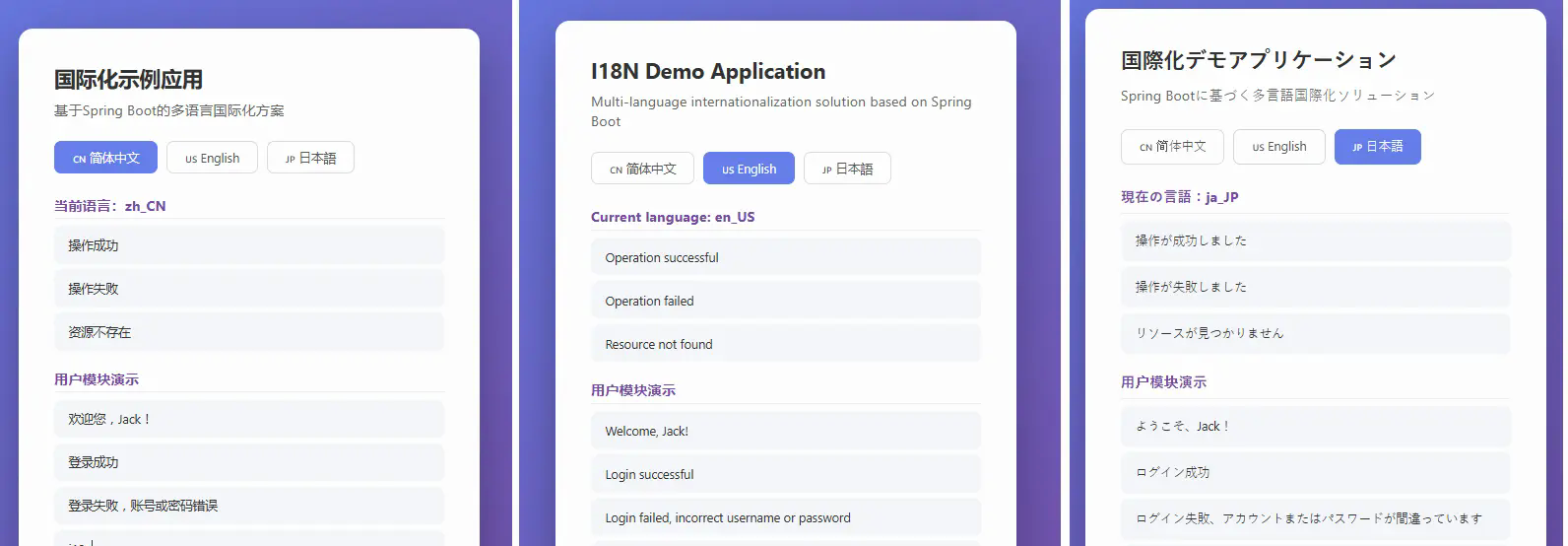
After switching to the comparison chart, you will find thatuse-code-as-default-message=trueThe parameters are valid, there is no configured Key, and the Key is displayed by default.
04 extension
The three languages are introduced above. If you want to add Kia language, just add the enumeration type and language file if necessary. There is no explanation in the enumeration case above, so I will add it here:
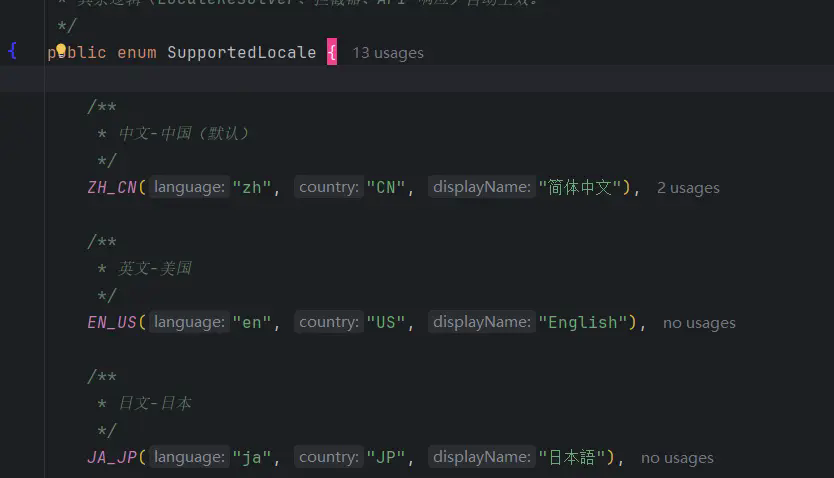
We have added Korean as an example.
4.1 Add items
// SupportedLocale.java
public enum SupportedLocale {
    ZH_CN("zh", "CN", "简体中文"),
    EN_US("en", "US", "English"),
    JA_JP("ja", "JP", "日本語"),
    // 新增韩语
    KO_KR("ko", "KR", "한국어");
    // ...
}
4.2 Create language files
exist src/main/resources/i18n/ Created under messages_ko_KR.properties:
# 한국어 (대한민국) 국제화 리소스
app.name=국제화 데모 애플리케이션
app.description=Spring Boot 기반 다국어 국제화 솔루션

common.success=작업 성공
common.fail=작업 실패
common.not_found=리소스를 찾을 수 없습니다

user.welcome=환영합니다, {0}!
user.login.success=로그인 성공
user.login.fail=로그인 실패, 계정 또는 비밀번호가 잘못되었습니다
Parameters only need to be passedlang=ko_KRThat’s it.